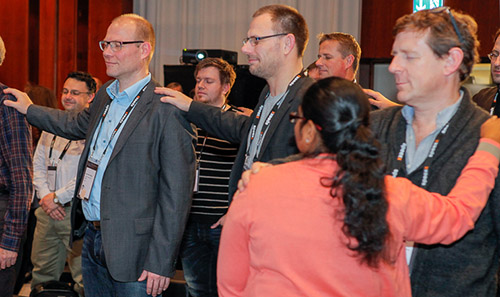
As I hinted at in my (Re)humanising eLearning post I directed a group performance entitled “A performance of connection and anxiety” as part of my Spotlight Stage session at Online Educa. The audience played the part of first year undergraduates while I represented ‘the institution’ in all its various forms. This involved everyone standing up, putting their hand on the next person’s shoulder and closing their eyes (100+ people seemed surprisingly willing to enter into this piece of shared theater).
Photograph by David Ausserhofer, Mark Bollhorst and Maren Strehlau. All copyrights by ICWE GmbH. CC 2.0 Germany
As I’d hoped this created a certain frisson in the room and when we remained silent for about 15 seconds that strange feeling of togetherness started to grow despite most of the audience being strangers to one other. I then circulated round the room ‘selecting’ individuals by tapping them on the shoulder while they had their eyes closed, representing the moments they might be ‘chosen’ or engaged with by your institution in some way.
Discussing this with people afterwards some commented that they had hoped to be chosen but they didn’t know why as I hadn’t explained what the implications would be. Others hoped not to be chosen but overall there was a healthy tension in the room – I like to think of this as the ‘good’ form of anxiety.
When I asked everyone to open their eyes and sit down if they hadn’t been selected many people were looking around to see who the chosen few were. At this point I admitted that I hadn’t chosen anyone which fortunately got a laugh (possibly of relief :).
Overall it did feel like we’d all shared in a specific moment of connection and one, as I outline in the original post, which worked between strangers because we were physically co-present. Gaining that sense of connection online requires more up-front identity work but I believe it’s crucial if we see the value of the digital as a place we can learn together.
The three key areas I proposed for consideration to create connection online and rehumanise elearning were:
1. Spaces
Think of and use the digital as a series of spaces or places where individuals can be co-present and connected. (rather than just a mechanism to broadcast content)
2. Eventedness
Design in synchronous moments or ‘events’ online. This helps to create a feeling of belonging and that ‘I was there’ factor. The technology to support this is now pretty reliable.
3. Conversation at scale
Design mechanisms for discourse to take place at scale. Hashtags, commenting, shared postings, crowd-sourcing, editathons etc. This is the area which we are least adept at but I believe the technology is now in place to support conversation at scale if we can design our teaching to take advantage of it.
All of the above are underpinned by individual’s developing an online presence and identity. Something which is central to almost all Digital Literacy frameworks but which we often don’t prioritise when supporting our students and/or staff.
This is an idea I’ve been musing over for a while and regularly encounter in different contexts. The phrase ‘Think Less – Find More’ is my suggested strap line for Google search as it’s essentially what they are selling. Obviously this isn’t how they market their search service but it is in essence the message they are giving to users. The evolution from keyword to natural language searching and the increasing use of user data to tailor results is part of a drive towards answering (in part) your information ‘needs’ before you even know you have them (I’m thinking of Google Now here).
CC – https://www.flickr.com/photos/erikeckel/2133261517
In the Visitors and Residents research project one of the questions we asked participants (students ranging from late-stage secondary school all the way through university) was “If you had a magic wand what would be the ideal thing you’d want to help you learn”. A common answer could be characterised as “Something which highlighted the best information and the right answers”. For example one student described a library type scenario in which the most useful books would glow in response to a question.
Unknowingly to our participants what many of these responses boiled down to was “I’d like Google to work perfectly” by which they meant that the top search results would be ‘correct’ so they wouldn’t have to spend time evaluating them or cross checking. So what we might describe as the process of research (evaluating and synthesising a range of sources into a cogent narrative or argument) they were thinking of as ‘what you have to do because the technology doesn’t quite work properly yet’. They had been sold Think Less – Find More.
I’m not saying that Google is evil or that these students were misguided, my point is that this is the culture we need to respond to in education. Our pedagogy is still based in Dewey Decimal times while our students (and staff) are actually operating in a radically different knowledge environment. If we take into account the Think Less – Find More culture shift this is a huge opportunity for us as educators. Google allows us to shift from knowledge transfer mode and concentrate on helping students to develop their ability to think. How we managed to create an education system which doesn’t have this as its central tenant is a mystery to me…
If we redesign teaching incorporating the Web we will be nurturing agile and powerful thinkers who can build on the power of abundant information rather than leaving them to worry that going online is tantamount to ‘cheating’.
I talk about Think-Less Find More and ‘Currencies of Credibility’ in this video:
I was delighted to be asked to keynote at the Designs on eLearning conference last month. It’s run by my group based at UAL and Penn State with a different host institution each year. This time it was Texas State with Claudia Roeschmann et al doing an excellent job bringing us all together.
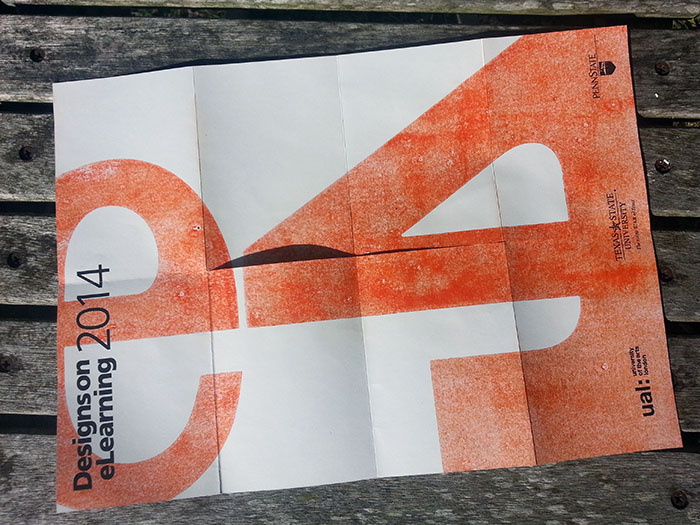
One of the various designs in the DeL mini-programme booklets,
Part of my job as Head of Technology Enhanced Learning is to develop institutional strategies around digital and learning so I thought the DeL keynote would be a great chance to propose a simple way of setting out the territory:
‘Digital’ is too broad a term to be useful now but it is still an area which is ‘different’ enough in the mind of institutions to be dealt with as a distinct entity. Whether this is a healthy approach is debatable as ‘digital’ and ‘technology’ tends to be defined as anything-that-is-new or anything-we-don’t-quite-know-how-to-use-yet. For example, technology that has become totally embedded stops being thought of as tech; email, texting, Googling etc. It’s not that we don’t know that it’s digital we just don’t discuss it in strategic terms because ‘everybody does it’. That tends to mean that digital strategies point towards incorporating the new without focusing on the better use of the mundane.
(The term ‘mundane technology’ was brought up by Jo Morisson from UAL who pointed out that smartphones are now ‘mundane’ but are integral to students day-to-day learning and creative practices i.e. the fundamental incorporation of the digital into practice tends to be around the use of ‘boring’, not-new, tech)
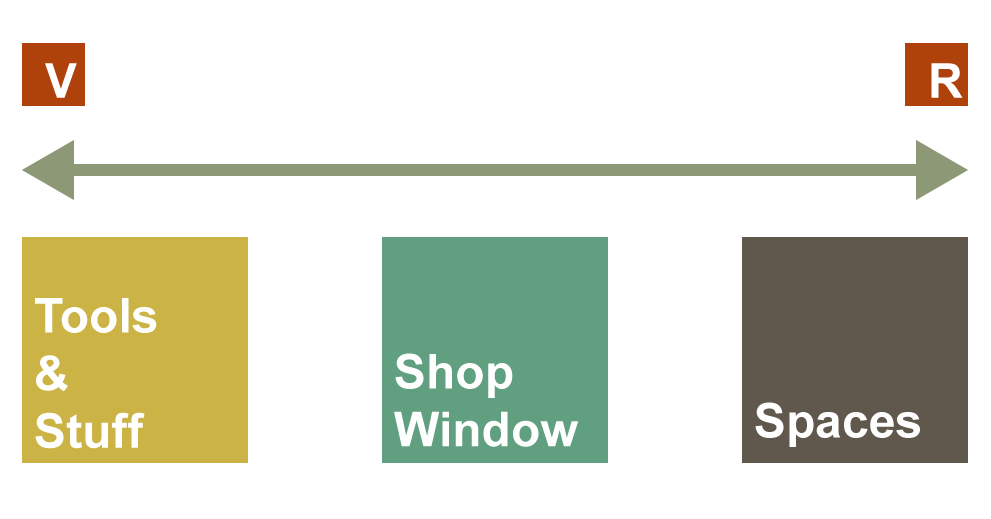
To attempt to break down the digital into manageable areas I suggested the following ‘practice boxes’ or categories which split the manner in which we use technology into three sections. This provides a very simple framework for discussions about where and how practice intersects with, or resides within, the digital. My Visitors and Residents framework underpins this approach which means that the boxes build on motivation-to-engage rather than the functional affordances of the technology (something which can be considered after you’ve decided what it is you are trying to achieve).
3 digital-practice boxes on the V&R continuum (CC attribution only)
From left to right:
‘Tools and Stuff’ – This is the predominant institutional perception of what digital technology is – a series of tools that help to make existing practices more efficient or better quality. It also tends to be students main expectation of the digital services their institution will provide. ‘Give me access to the right tools (including the Web) and access to digital content (stuff) that will help me get through my course. This was one of the key findings from or recent work on The Digital Student project for Jisc. No social trace is left in this mode which is mainly about information seeking, and non-visible production & consumption.
‘Shop Window’ – This is a shift from Tools and Stuff towards using the Web as a place for publication and dissemination – the look-at-what-I-have-created motivation which is essentially using the Web as a means of distribution for self-generated content. This is institutions and individuals in broadcast mode and while work that is being presented might be ascribed to the creator of that work it is not necessarily connected to a persona as such beyond a name or a brand. The Web becomes a location to promote the best of our completed work with the actual creative or intellectual practice taking place offline or in non-visible tools.
‘Spaces’ – This is where the digital (mainly the Web) becomes a series of spaces or places in which we enact our practice. We go to these spaces to be present with others in some form. This could be within private groups or openly online. So the Web becomes the location where we develop work and thinking in a ‘networked’ or communal manner. This involves individuals operating via (or being embodied within) a digital identity of some form which might be a simple projection of self or could be a deliberately disassociated, managed or pseudonymous persona. (This gets philosophical very quickly but a simple version would be an individual being in ‘student-mode’ when in certain digital spaces). I’ve broken this category into three sections:
Using digital spaces to communally or collaboratively create work. For example, collaborative editing of Google doc or using an online whiteboard/sketching platform to build work in groups. This type of activity could be ‘live’ or asynchronous but the closer to live it is the more the digital will feel like a space rather than a tool.
Discourse around artifacts. – This is the most common form of activity within this category and is possibly the most broadly relevant in an educational context. I’m most interested in forms of discourse which influence the evolution of work, for example a constructive discussion in the comments on a blog post which leads to the original author refining their ideas. It could also be the discourse of a group negotiating the direction of future activities and posting iterations of work which is developed outside of the digital space in which the discussion is taking place. Obviously material that is posted in Shop Window mode can become the focus for discourse with the possibility of recontextualisition or remixing.
Critique or re-appropriation of digital spaces – this one is more specific to Art & Design but important nevertheless. The digital is a space that should be questioned a deconstructed as a place where society resides and operates. This is something that the creative arts need to be doing if they wish to be a relevant voice. I was disappointed with the recent Digital Revolution exhibition at the Barbican which made no attempt to deconstruct the digital in this manner and simply presented a parade of amusing and entertaining digital bits and bobs. In an age of ‘elegant digital consumption’ Art & Design needs to re-present the Digital through a critical and questioning lens.
——
What’s interesting is how the pedagogy we use can shifts teaching practice from Shop Window to Spaces within given platforms. For example at UAL both our blogging (WordPress) and our ePortfolio (Mahara) platforms can be used in both modes depending on the teaching approach. It’s even possible to gently transition from Shop Window to Spaces within these platforms over time which has enormous potential for supporting students in developing their practice and in building professional/practice based online personas.
My hope is that the 3 categories will frame conversations within and beyond UAL and break down the ‘digital’ in a useful non-tech-deterministic manner.
(…and why there’s no such thing as ‘information-seeking’ for school students)
This month Jisc published a report I wrote with Joanna Wild about secondary school student’s experience of technology for learning. The report is part of The Digital Student project and makes recommendations to the Higher Education sector about how to meet and manage incoming student’s expectations of the digital environment.
The emphasis in the report wasn’t on the technology the schools owned but on how they incorporate it into the day-to-day curriculum. Generally what we found was that within the classroom digital technology is used in the service of making existing pedagogical processes more efficient rather than as an opportunity to engage students in new ways – an example being the frequent, non-interactive, use of PowerPoint by teachers. This appears to be an effect of the training available to staff which generally concentrates on functional skills, neglecting discussion of how technology can be effectively incorporated into teaching.
I’ve spent the last few years discovering how students go about learning now that the Web exists. Given that I was fascinated/bemused by the apparent disconnection between the classroom and how homework gets done. It’s truly strange that homework is set by schools with the assumption that the Web will be used to complete it but without admitting this fact institutionally. This is to the extent that many students don’t even receive textbooks for key subjects.
So on the one hand the Web is talked about as a place where you have to be wary of the quality of information and on the other it’s absolutely integral to successfully undertaking your studies. This feels to me like the start of The Learning Black Market for students and in theory puts them in a dissonant situation as they attempt to bridge the divide between the classroom and the way they complete homework. I say in theory because the quality of information to be found online will be very high and because they won’t be required to cite sources for much of their school career. So in essence the system works but not by design – it’s disconnected and I don’t see much evidence of it being brought together.
The problem here is more to do with ‘knowing’ than with technology. I explored the notion of a loss of ontology when discussing the relationship between Wikipedia and education and I believe that this is a significant effect of the disconnect between the classroom and home. Students are developing basic approaches to finding and using information online without much support from school. Obviously the aim of the game is to complete your homework as quickly as possible and then go out and play football with jumpers for goalposts (yes, yes, I know).
The sheer efficiency of the Web means that students can leap to a highly focused answer online without having to build a knowledge map of the discipline territory. In some senses there is no process of ‘information seeking’ – simply type a question into Google and the answer will appear. Crucially (and I’m happy to labour the point) the information ‘discovered’ will be good enough/excellent so raising eyebrows in a library-style fashion about this approach not-being-proper is not relevant.
This then shifts the task in hand to masking the fact that most of your homework can be completed with the use of one super-convenient source that appeared in the top three links returned by Google (often Wikipedia). From what I’ve seen that means ‘how to delicately rewrite stuff I’ve found online so I can’t be accused of copying’. (…to be fair that’s the same as it ever was in school but it’s more efficient and so more prevalent with copy and paste)
Possibly Hugh MacLeod? via http://goo.gl/qkbG2B
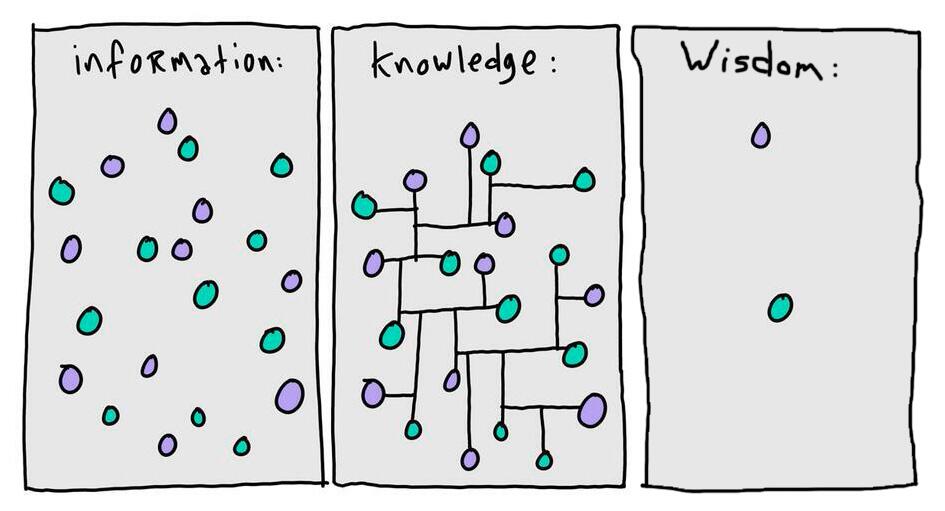
This (slightly trite) diagram helps to illustrate what I see as the challenge formal education needs to respond/adapt to. Historically the connecting lines that evolve ‘information’ to ‘knowledge’ (I’d use the term learning myself) were partly formed by the process of information seeking -the effort required to piece together understanding by locating and trawling through books. The connections that build an ontology of information were a side effect of this relatively inefficient process. Or, in a lesser way, they were implicit in the structure and layout of your textbook. Now that information seeking is all but dead these lines are less likely to be formed, especially when doing homework. Wisdom isn’t my specialty but I’d argue that deep understanding comes from making connections and not simply discovering scattered answers.
This is the central disrupting effect of the Web on formal education, a disruption of pedagogy and epistemology. Our response should be to bridge the disconnect between the classroom and homework by designing curricula that explicitly accepts the Web is already central to how education operates and is a legitimate source of information.
Last November I was invited to speak at a meeting of the UK arm of the Wikipedia Education Program who support the integration of Wikipedia into mainstream education. Much of their focus is on providing advice and resources around contributing to Wikipedia as an alternative to writing essays or reports.
My talk was titled “What’s left to teach now that Wikipedia has done everyone’s homework?”. The basic premise being that if the answer to your homework/assignment is a Wikipedia article then you need to change the way you teach.
For me this was hugely exciting and a little daunting. Wikipedia is, in my opinion, the most popular and valuable educational platform since the invention of the printing press so I wanted to contribute to the best of my ability. On the day I discovered that the venue (the Barbican) provided its main-stage speakers with dressing rooms which was a new, and slightly strange, experience. I also knew that I was on the programme with Wikipedia’s Senior Designer Brandon Harris (@jorm) and all round nice-guy genius Jack Andraca (@jackandraca) – not easy people to keep up with (but extremely inspiring).
During the conference it became clear that the Wikipedians are generally so focused on what Martin Poulter described as the ‘axiomatic’ vision of “…a world in which every single person on the planet is given free access to the sum of all human knowledge.” that they rarely consider the impact Wikipedia is having on a range of institutions and professions. I hope that my talk went some way towards addressing this in regard to education.
The main concept I added to the talk for Wikimania was about ‘Loss of ontology’. The idea that our ability to efficiently search for pinpoint answers means that we don’t build the kind of ‘knowledge maps’ we used to when we had to seek out sections of specific books or journals etc. Given this if our pedagogy is still based on discovering answers then the existence of platforms like Wikipedia might mean our students aren’t learning as much as we hope. This, I pointed out, is a fault in our teaching methods which often don’t properly account for the Web and not a reason to attempt to ‘ban’ or besmirch Wikipedia.
The phrases from my talk which appear to have been most Tweeted were:
“The problem with Wikipedia is not that it’s inaccurate it’s that it’s too good” (i.e. you can find a decent answer without having to ‘think’)
and
“Wikipedia isn’t a threat to education, it’s a gift”. (assuming we move from a pedagogy of answers to a pedagogy of questions – teaching students how to critique and edit Wikipedia is one way we can make this move.)
This is probably not a question you want a comprehensive answer to but it would be handy to know how they are using the Web to engage with the learning challenges you are setting.
I’m currently leading a project with the Higher Education Academy which uses the ‘Visitors and Residents’ mapping process to help teaching staff to gain a better understanding of how their students are using the Web for their learning. Successful applicants will receive £1500 to attend two workshops (12 Feb and 7 May 2014). The first workshop will teach you how map your own online practice to set you up to run the process with a group of your students. The second workshop will review the maps generated by your students and provides an opportunity to explore how you might evolve your teaching practice to engage them in new ways online.
Simple Visitor & Resident map
The pilot version of this workshop format proved very successful, with a number of institutions going on to run further mapping sessions at their institutions to get an holistic, high level, sense of how the Web is being using in teaching and learning by both staff and students (with the view to informing overall teaching and learning strategy/policy).
Obviously I’m biased but I like to think that the mapping is a pragmatic way of understanding online learning practices which often go undiscussed in education. It has proved to be a good starting point for reflecting on overall approaches to teaching and for informing how best to work with students online: for example, negotiating the complexities of connecting with students in platforms which are based on a ‘friendship’ paradigm.
It’s only a 500 word application process so if you are part of a higher education teaching team in the UK please take a look at the form on the HEA website. The deadline for applications is the 20th of January. Perhaps I will see you at the workshops? 🙂
Back in June I wrote a post about the Visitors and Residents mapping process. Since that posting I have run mapping sessions with people in various roles from a range of institutions. This has helped me to refine and simplify the process.
During those sessions I got requests to produce a V&R mapping kit that people could use to run the process with groups at their institution. I haven’t got as far as I would like with that yet but in the meantime I have extracted the most relevant 10 minute segment from the original mapping video. I’m hoping that anyone who watches this extract will have all the info they need to create their own map.
A single engagement map is all that is required for an individual and should drive a useful discussion if the mapping is done in a group situation. It should also be useful to then create a map of your department/library/project/group. This way you can assess the digital footprint (The character and visibility of your group online) of your section of your institution and the various modes of engagement you may, or may not, be using. It’s worth noting that if you are mapping with students some of them may relate better to the word ‘course’ instead of ‘institutional’ on the vertical axis of the map.
I have collated a few maps from various people (including my own from the video) on this Padlet wall so you can get a sense of how varied the process can be depending on the context of the individual: http://padlet.com/wall/visitorsandresidents